

“Wait, didn’t we just close that position?”
“Finance says we don’t have budget approval, but HR already started recruiting…again.”
“Why do our headcount numbers never match?”
If these questions sound familiar, you’re not alone.
Across fifteen years in the Workday ecosystem, we’ve seen even the most sophisticated organizations struggle with position management. Of the hundreds of Workday customers we have implemented for, assessed, or compared notes with at user events, roughly eight in ten run position management rather than job management, for the headcount control it promises. Many end up in complete chaos instead.
The root causes? Five recurring mistakes that derail position management, turning what should be a strategic advantage into a constant source of friction between HR, Finance, and Recruiting teams.
Here’s the good news: These mistakes are entirely preventable. But first, you need to know which ones are affecting YOU most severely.
Mistake #1: Having an Unclear Definition of Position Management
One of the biggest and most common mistakes organizations make is not clearly defining what position management means in their company. Position management is the staffing model in Workday that provides the greatest control over hiring by enabling you to define specific hiring rules for each position.
From our experience across 40+ implementations, it’s not the concept that breaks down, it’s how positions are managed. This applies both pre-hire and throughout the hire-to-retire process.
For example, how do you manage positions when promoting within your organization? You might define an in-line promotion as the employee staying in the same position. An out-of-line promotion might be moving from one position into a different position within the company.
If you’re defining these scenarios and all other combinations of position movement, you need to document them and set clear expectations with team members transacting in Workday. That’s how you set up your position management for success. While there could be a right and wrong way, it’s more about consistency and clarity across your organization.
The Problem
When transacting on multiple positions, things get messy fast. Organizations get sucked into data management and reconciliation instead of strategic work, all because position management isn’t clearly defined.
Without clear definitions, everyone does something different. Your positions get misaligned, and you’re doing more cleanup than strategic work. According to Mercer’s Global Talent Trends 2024, 67% of organizations adopt new technology without transforming how they work, exactly what happens with position management.
The Solution
Though unclear position management can cause significant problems, the fix is relatively straightforward. Create a clear, comprehensive framework that defines:
Protocols for opening and closing positions: When can positions be created? Who approves position creation? Under what circumstances should positions be closed versus left open for backfill?
Responsibility assignments: Name specific people who can create positions and specific people who can close them. Establish clear ownership for each transaction type.
Timing parameters: Define exactly when positions can be opened and closed throughout the employee lifecycle, from initial hiring through terminations and everything in between.
Transaction scenarios: Document inline promotions, out-of-line promotions, lateral moves, terminations with/without backfill.
For example, inline promotions (marketing manager to senior marketing manager) keep the employee in the same position. Horizontal moves (marketing manager to Workday Analyst) require moving to a new position with supervisory org adjustments.
These movements should be clearly defined in Workday HCM with processing guidelines for each scenario.
When used correctly, position management aids strategic activities that move your business forward: making better sense of positions for forecasting, helping HR and Finance with growth planning, and enabling org modeling that actually reflects your business structure.
Here’s a simple framework to help you get started:
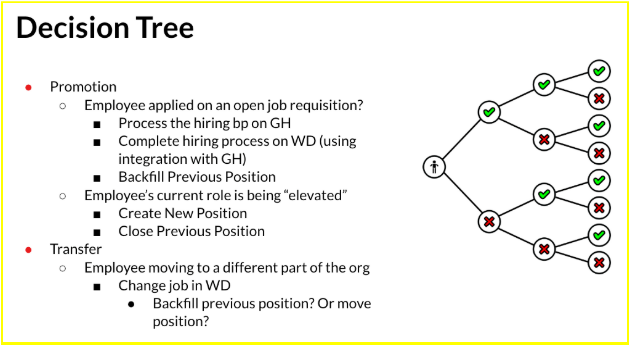
💡 Implementation Tip: When one of our clients implemented this framework, they reduced position creation time from 3 weeks to 3 days and eliminated 90% of their Finance-HR reconciliation meetings. See how they did it in your scorecard results.
How Do You Know If You Have This Problem?
Ask yourself these questions to assess whether unclear definitions are causing issues:
-
Do different team members handle the same scenario (like terminations) differently?
-
Are you constantly cleaning up position data rather than using it strategically?
-
Do managers and HR partners disagree about whether positions should be closed or left open?
-
Has anyone ever created a “workaround” because they didn’t know the correct process?
-
Do Finance and HR have different understandings of what counts as an “open position”?
If you answered yes to two or more of these questions, you likely need a clearer position management framework. For comprehensive guidance on building this framework, see our guide on Workday position management best practices.
Mistake #2: Focusing on ATS Integration Instead of Holistic Headcount Planning
There are two categories of position management in relation to hiring: pre-hire and the hire-to-retire process. For now, let’s focus on common integration mistakes we see organizations make regarding position management for the pre-hire process.
The Problem
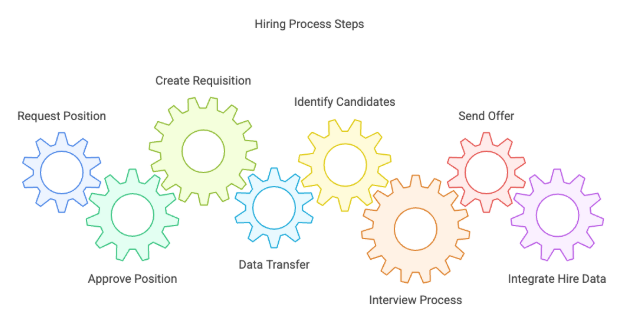
Most companies integrate a third-party ATS and build a custom Workday integration. That’s necessary for the end-to-end pre-hire process.
However, most organizations make a critical mistake: focusing exclusively on the ATS integration rather than elevating to holistic headcount planning.
When you’re only concerned with technical integrations, you miss the opportunity to build a unified strategy including budget alignment, approval workflows, and cross-functional coordination. This creates fragmented processes, wasted time, and expensive mistakes like over-hiring or misaligned budgets.
The Solution
Organizations should ask themselves a series of strategic questions when building these integrations:
Where is Finance involved? At what point does Finance review and approve new positions? How do budget changes flow into position creation?
What happens during annual planning? Do all approved positions automatically go into a hiring tracker? Who manages the tracker? How do you distinguish between approved-but-not-yet-hiring positions versus actively recruiting positions?
What happens with incremental headcount requests? Where are Finance, Recruiting, and HR involved in net new requests that occur mid-year, outside of annual planning?
What happens when offers are extended? Who reviews offer details before they come back through to Workday? How do you ensure offers align with approved position parameters?
What if compensation, job level, or title changes during recruiting? If a position was approved at one level but Recruiting determines a higher level is needed, who approves that change? Is Finance involved?
The list goes on, but the lesson is clear: elevate the conversation from just an ATS integration to your entire headcount planning process. When you do this, you can be confident that you have the right people and the right technologies in place to optimize workforce planning as a whole, not just the recruiting workflow.
The lesson holds regardless of tooling: treat the ATS integration as one step inside headcount planning and position governance, not as the whole of it.
What Questions Should You Ask About Your Headcount Planning?
Budget & Planning: When does budget approval happen? How do you track approved vs. actively recruiting positions? Who owns the headcount plan?
Cross-Functional Involvement: When are Finance, HR, and Recruiting involved? Who approves recruiting changes? How do handoffs happen?
Technology & Integration: Does your ATS validate budget? Can you see the full pipeline from approval to filled positions? Are there manual workarounds?
Mistake #3: Lack of Clear Ownership and Accountability
A lack of ownership and accountability for position management isn’t just a case of “whodunit” when someone gets moved to the wrong supervisory org or a position is closed that should have been left open.
It’s specifically when Finance, HR, and Recruiting aren’t aligned on positions and headcount, creating confusion about who creates, closes, or moves positions, and lacking governance around all of it.
The Problem
Creating, moving, and closing positions are basic Workday transactions. Without accountability for who’s doing it, why, and proper oversight, one person’s mistake throws off your entire system.
Lack of ownership and accountability leads to:
Mismatched headcount numbers: Finance, HR, and Recruiting all show different position counts, creating friction and eroding trust.
Incorrect budget forecasts: Budget projections become unreliable when positions are created or closed without oversight.
Compliance risks: Position management errors surface as control weaknesses during audits.
Wasted time: Countless hours spent in reconciliation meetings untangling position data.
The Solution
We recommend several tactics to establish clear ownership and prevent these issues:
1. Set up system guardrails for when positions are created or closed. Implement business process security that prevents unauthorized changes and maintains a clear audit trail of who made what changes and why. These guardrails should validate that required approvals are obtained before positions can be created or closed.
2. Use validations in business processes to prevent users from making mistakes before they happen. For example, require budget code validation before allowing position creation. Require manager approval before allowing position closure. These validations catch errors in real-time rather than during cleanup.
3. Designate headcount planning administrators who are responsible for the pre-hire position management process. Choose one or two people to become the central points of accountability. These administrators should have elevated permissions and serve as the final check on position-related transactions.
There are multiple ways to implement these steps in Workday, and we’ve seen dozens of highly successful configurations. But the bottom line is that having clear accountability and ownership for position management helps keep it streamlined, accurate, and on track for the entire organization.
Quick win: the fastest way to establish ownership is to name a single Position Management Administrator. One named owner ends most of the “who approves this?” churn on its own.
For comprehensive guidance on establishing ownership, see our article on Workday position management best practices, which includes detailed RACI matrix examples and ownership models.
Who Should Own What in Position Management?
Finance: Budget approval for new positions/closures. Final authority on budget availability.
HR: Position data accuracy and lifecycle management. Creates positions after Finance approval. Manages promotions, transfers, reorganizations.
Recruiting: Requisition creation and candidate management. Creates requisitions for approved positions only.
Managers: Request new positions and initiate changes. Cannot create/close without approval.
HR Systems/Admins: System guardrails, security, audit reporting, business process definitions.
Mistake #4: Mismanaging Data During Hire-to-Retire
Now let’s move from pre-hire to the hire-to-retire process. This involves business processes for job changes, terminations, transfers, and promotions. Here, data mismanagement is a very common issue for most organizations.
The Problem
During an inline promotion (marketing manager to senior marketing manager), multiple questions arise:
-
Should the employee stay in the same position with updated attributes?
-
If becoming a manager, do we create a supervisory org?
-
How do we handle compensation changes?
-
When does a vacated position become available for backfill?
Before you know it: closed positions that should be open, people in wrong supervisory orgs, and mismatched attributes.
Many organizations also fail to define end-user permissions. When managers use Self-Service without proper guidance, mistakes happen. The more people with position access, the higher the error rate.
The Solution
Much like the pre-hire process, you need distinct definitions of what to do when people move positions within your organization. It’s also important to establish clear guardrails that prevent common errors.
Define every scenario: Document how to handle inline promotions, out-of-line promotions, lateral transfers, demotions, terminations with backfill, terminations without backfill, leaves of absence, and reorganizations. Each scenario should have clear steps.
Implement change management training: Position changes impact multiple stakeholders across your organization. Without proper training, even managers with the best intentions can create chaos for HR, Finance, and IT teams. Training should be role-specific and scenario-based, walking users through common situations they’ll actually encounter.
Narrow access and usage: Carefully define and document who can do what. Understanding which end users have which permissions helps minimize position management mistakes. Consider restricting Manager Self-Service capabilities until your organization has matured in its position management practices.
Create validation checkpoints: Build business process validations that prompt users with questions before allowing certain actions. For example, when processing a termination, require the user to indicate whether the position should be closed or flagged for backfill.
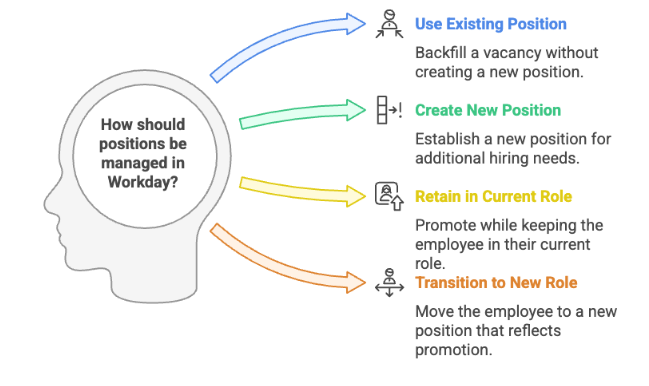
We understand that implementing these strategies can be challenging, so we’ve created a simple position management matrix to help you get started:
What Data Issues Should You Watch For?
Promotions: Position attributes not updated, supervisory orgs misconfigured, positions closed incorrectly
Terminations: Position closed when should be backfilled (or vice versa), worker separated but position status not updated
Transfers: Old position not released, attributes transferred incorrectly, reporting relationships broken
Reorganizations: Mass moves without proper sequencing, supervisory org misalignment, budget codes not updated
Mistake #5: Enabling Self-Service Too Early Without Proper Guardrails
One of the most common mistakes companies make when implementing Workday is rolling out self-service capabilities to automate processes or “throw it over the wall” so operations doesn’t have to manage everything.
But this seemingly efficient decision has surprisingly disastrous consequences.
The Problem
Enabling self-service during Workday implementation often creates more errors, not fewer. When managers initiate headcount changes without proper guidance or guardrails, they make mistakes impacting budgets, org structure, and recruiting.
Operations teams still have to audit and clean up data, often taking more time than handling transactions themselves.
Most organizations end up restricting Self-Service after these challenges, wasting the implementation effort. According to AIHR research, inadequate training and enablement is among the most common HR tech integration mistakes.
The Solution
We always recommend a phased approach to self-service for position management and headcount tools:
Start slow and intentional: Begin with a small group of power users or a single department. Test processes thoroughly before expanding access. This allows you to identify pain points and refine your approach before scaling.
Implement robust system validations: Create validations that prevent common errors before they happen. For example, if a manager tries to close a position during a termination, the system should prompt them to confirm this action and explain the implications. Validation rules should guide users toward correct actions rather than simply blocking incorrect ones.
Create intuitive guidance: Build in-system help, tooltips, and decision trees that guide users through complex scenarios. When a manager selects “promote employee,” the system should explain the difference between inline and out-of-line promotions and help them make the right choice.
Provide comprehensive enablement: Before rolling out self-service, invest in training that covers not just how to use the system, but when and why to use specific functions. Training should include realistic scenarios and common mistakes to avoid.
Establish support mechanisms: Create clear escalation paths for when managers encounter situations they haven’t been trained for. Have HR business partners or position management administrators available for consultation.
Mature your processes first: Don’t enable self-service until your organization has a proven track record of clean position management. If you’re still cleaning up data or resolving definition issues, adding more users with access will only multiply problems.
Roll out gradually: Once you do enable self-service, phase it in by user group or transaction type. Start with low-risk transactions like viewing position information or requesting new positions. Only after demonstrating success should you expand to higher-risk transactions like position modifications or closures.
This way, those with access to position management, managers, business partners, operations teams, and administrators, are all properly trained and can support each other in keeping positions accurate and clean. That’s the ideal time to expand self-service because you have the infrastructure, support, and change management in place to make it successful.
When Is the Right Time to Enable Manager Self-Service?
Process Maturity: Clean data for 2+ quarters, frameworks documented and followed, minimal escalations
User Readiness: Managers trained, 90%+ completion rates, support resources available
System Readiness: Guardrails tested, error-catching reports in place, audit processes monitoring transactions
Organizational Readiness: Executive sponsorship, HR/Finance aligned, change management support available
Transform Position Management Mistakes Into Strategic Advantages
These five position management mistakes might seem overwhelming, but they’re entirely preventable with the right approach.
The key is knowing which mistakes are affecting you most severely and addressing them in the right order.